Configuration help¶
This is a reference for the most useful configuration options (as found
in the config screen). For complete coverage refer to
Configuration. The config file is saved typically in
~/.compare_my_stocks and is called myconfig.yaml.
One section per GUI block — every entry below names the YAML path it controls, what the value is for, and where to get it when it's an external token.
The easiest way to edit any of these is the bundled config GUI — launch from a checkout with
.\runconfig.ps1, orpython -m compare_my_stocks.gui.config_gui. The GUI saves a timestamped.bak.<ts>copy of the YAML next to the live file on every write.
Quick index:
- IB — Activity Statement (CSV)
- IB — Flex Web Service token + query
- IB — Gateway / TWS connection
- My Stocks Portfolio CSV (Peeksoft)
- Fundamentals providers (RapidAPI keys + earnings selector)
- Polygon API key
- Input source (price-history backend)
- Behavior toggles
1. Interactive Brokers — Activity Statement (CSV)¶
YAML block: TransactionHandlers.IBStatement
A one-off CSV export from IB Client Portal. The app reads it on startup to seed historical open positions and realized P&L — useful when the Flex query alone doesn't cover far enough back, or when you don't have Flex set up at all.
| Field | YAML key | What it does |
|---|---|---|
| Source file | SrcFile |
Path to the downloaded Activity Statement CSV. The full path goes here verbatim — no globbing. |
| Portfolio name | PortofolioName |
Free-text label that appears next to this portfolio in the UI. Pick anything memorable (e.g. "IB-Live"). |
How to export the CSV¶
- Log in to Client Portal.
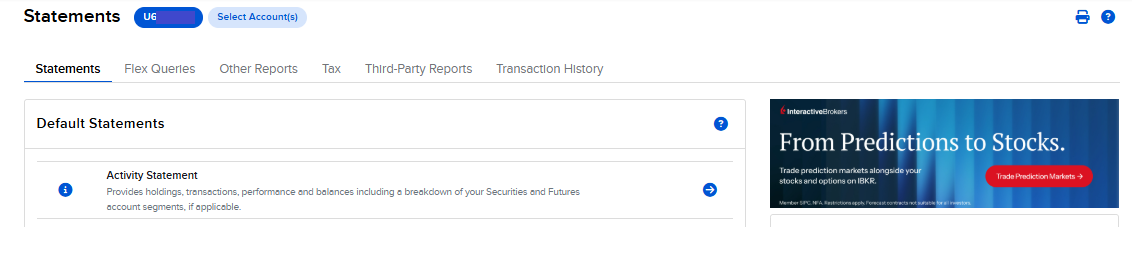
- Open Statements from the top navigation. The page header reads Statements, with tabs Statements / Flex Queries / Other Reports / Tax / Third-Party Reports / Transaction History.
- On the Statements tab, in the Default Statements panel, click the arrow next to Activity Statement.
- Set the period (~1 year back is a good default — gives Flex a runway to catch up from) and choose Format: CSV.
- Click Run → Download. Save somewhere stable, e.g.
C:\Users\you\Downloads\Uxxxxx_YYYYMMDD.csv. - Paste the full path into IB Statement → SrcFile.
2. Interactive Brokers — Flex Web Service token + query¶
YAML block: TransactionHandlers.IB
The Flex Web Service lets the app pull new trades automatically over HTTPS on every launch, with no need to keep TWS logged in for trade data (you still need TWS/Gateway for live prices — see § 3).
| Field | YAML key | What it does |
|---|---|---|
| Flex token | FlexToken |
Token generated under Flex Queries → Flex Web Service. Lets HTTPS callers (the app) authenticate as you. Tokens expire periodically — when queries start failing with code 1012, regenerate. |
| Flex query ID | FlexQuery |
Numeric ID of the Activity Flex Query you saved. The query defines which sections (Trades, Cash Transactions, Open Positions, …) get included. |
How to obtain them¶
- From the same Statements page, switch to the Flex Queries tab.
- Under Flex Web Service click the gear / "Configure" icon and generate a token. Copy it into Flex token.
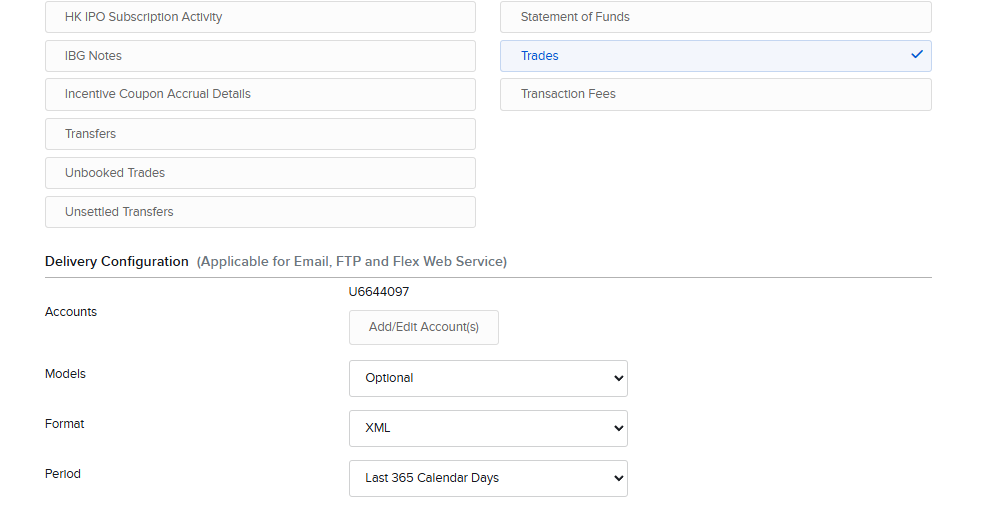
- Create a new Activity Flex Query. In the section picker tick at least Trades.
- In Delivery Configuration set Format to
XMLand Period to something covering your history (e.g. Last 365 Calendar Days). Select your account under Accounts. - Save the query and copy its Query ID (a numeric id) into Flex query ID.
See also § 8 for Do query / Prompt on query fail / Only newer than IB statement — the behavior toggles that decide when and how much of the Flex output gets ingested.
3. IB Gateway / TWS connection¶
YAML block: Sources.IBSource
How the app reaches your local IB Gateway or TWS for live price history and current positions.
| Field | YAML key | What it does |
|---|---|---|
| IB host | HostIB |
Hostname where Gateway / TWS is running. 127.0.0.1 for local. |
| IB port | PortIB |
Socket port configured in TWS Edit → Global Configuration → API → Settings. IB's stock defaults: 7497 TWS paper, 7496 TWS live, 4002 Gateway paper, 4001 Gateway live. This checkout's bundled default is 7596 — pick whichever and make TWS match. |
| Sidecar port (legacy) | IBSrvPort |
Kept for YAML back-compat. The current build runs ib_async in-process; this field is unused at runtime. Leave the default. |
Recommended: sign in to TWS / Gateway read-only, and also tick API → Settings → Read-Only API. The app never needs write access — no order placement, no account modification.
4. My Stocks Portfolio CSV (Peeksoft)¶
YAML block: TransactionHandlers.MyStocks
Optional second transaction source — the CSV exported by the My Stocks Portfolio & Widget Android/iOS app. Use it to ingest trades from non-IB brokers or manual entries alongside the IB feed.
| Field | YAML key | What it does |
|---|---|---|
| Source file | SrcFile |
Path to the exported CSV. |
| Portfolio name | PortofolioName |
UI label for this portfolio. Pick something distinct from the IB one (e.g. "Personal-Other"). |
Behavior knob worth knowing about: TransactionHandlers.JustFromTheEndOfMyStock
on the Behavior tab (§ 8) — only ingest My Stocks rows dated after the
last IB trade. Handy when you use My Stocks purely as a "scratchpad" for
trades that aren't in IB yet.
5. Fundamentals providers¶
This is where credentials for third-party fundamentals live — stock splits, earnings, P/E and P/S ratios, and the per-symbol info table inside the embedded Jupyter notebook. Price history doesn't come from here (see § 6–7); these endpoints are strictly for data IB doesn't provide.
5.1 What "fundamentals" covers¶
| Data | Used by | Provider(s) |
|---|---|---|
| Stock-split history | transactions/stockprices.py to back-adjust shares across splits |
yfinance (RapidAPI) |
| Per-symbol fundamentals table | Default notebook's get_info() |
yfinance (RapidAPI) |
| Quarterly revenue / net income | Types.PERATIO, Types.PRICESELLS graph types |
yfinance or Seeking Alpha (configurable) |
| P/E and P/S ratios | The same two graph types and notebook columns | Seeking Alpha (RapidAPI) |
If you don't subscribe to either RapidAPI endpoint the app still works — you just lose split adjustment and the P/E / P/S overlays. Set Disable earnings (§ 5.5) to silence the warnings.
5.2 yfinance via RapidAPI¶
YAML block: Jupyter. RapidAPI listing:
https://rapidapi.com/asepscareer/api/yfinance-stock-market-data
This is the main fundamentals key — single subscription unlocks splits, notebook fundamentals, and (optionally) earnings.
| Field | YAML key | What it does |
|---|---|---|
| Host | RapidYFinanaceHost |
Usually yfinance-stock-market-data.p.rapidapi.com. The X-RapidAPI-Host header value. |
| Key | RapidYFinanaceKey |
Your X-RapidAPI-Key. Powers: (a) /splits endpoint for split history, (b) the notebook's company-info / fundamentals table, (c) the YFinance earnings backend when selected (§ 5.5). |
5.3 Seeking Alpha via RapidAPI¶
YAML block: SeekingAlphaHeaders. RapidAPI listing:
https://rapidapi.com/apidojo/api/seeking-alpha
Optional, narrow-purpose key for P/E and P/S specifically. Skip it if you don't need those overlays.
| Field | YAML key | What it does |
|---|---|---|
| Host | X_RapidAPI_Host |
Usually seeking-alpha.p.rapidapi.com. |
| Key | X_RapidAPI_Key |
RapidAPI key for the seeking-alpha endpoint. Without it you can still set the earnings provider to YFinance and get equivalent data from the yfinance key. |
5.4 Legacy StockPricesHeaders¶
YAML block: StockPricesHeaders
Old slot pointed at stock-prices2.p.rapidapi.com. Kept so older config
files keep loading. New setups should leave both fields blank — the
split-history path now uses the yfinance key in § 5.2.
5.5 Earnings provider selector¶
YAML block: TransactionHandlers.Earnings. Controls which of the two
keys above is actually called for quarterly revenue / net-income data
(the input to Types.PERATIO and Types.PRICESELLS).
| Field | YAML key | What it does |
|---|---|---|
| Earnings provider | Provider |
One of: PreferSeekingAlpha (default) — use Seeking Alpha if its key is set, else fall back to yfinance, else leave empty. PreferYFinance — same logic, yfinance preferred. SeekingAlpha — force Seeking Alpha; fails if § 5.3 isn't set. YFinance — force yfinance; reuses the § 5.2 key, no extra subscription. |
| Disable earnings | NoEarnings |
Skip P/E and P/S processing entirely. Turn on when neither RapidAPI key is configured and you'd rather not see the "missing earnings" warnings. |
YFinanceFile (yaml only) |
YFinanceFile |
Cache file for the yfinance backend (defaults to earnings_yf.cache, sitting next to the original earnings.cache). Bump the filename if you ever need to invalidate that cache without touching the Seeking Alpha one. |
YFinanceEndpoint (yaml only) |
YFinanceEndpoint |
Path on the yfinance RapidAPI host that gets POSTed for income statements. Defaults to /income-statement and rarely needs changing. |
5.6 Getting a RapidAPI key¶
- Sign up at rapidapi.com.
- Open one of the API pages linked above.
- Pick the free tier (or paid if you'll exceed it) and Subscribe.
- On the API page open the Endpoints tab. The right-hand pane
shows the
X-RapidAPI-HostandX-RapidAPI-Keyvalues — copy them into the matching Host / Key fields above.
6. Polygon API key¶
YAML block: Sources.PolySource
Required only when the Input source (§ 7) is set to Polygon.
| Field | YAML key | What it does |
|---|---|---|
| API key | Key |
Polygon API key from the polygon.io dashboard. Used for all price history fetches when Polygon is the selected input source. |
7. Input source¶
YAML block: Input
| Field | YAML key | What it does |
|---|---|---|
| Input source | InputSource |
Where price history comes from. IB — pull via the IB sidecar / ib_async (most accurate, needs Gateway/TWS running). Polygon — pull from polygon.io (needs § 6). InvestPy — investing.com scraper. Cache — never fetch; read only what's already in hist_file.cache. |
The selected source fills hist_file.cache; subsequent runs reuse the
cache and only fetch the gap since the last update.
8. Behavior toggles¶
YAML block: assorted (TransactionHandlers.*, Sources.IBSource.*,
Running.*). Defaults are sane — flip these only when you know which
behavior you want to change.
8.1 Transaction merging — TransactionHandlers¶
| Field | YAML key | What it does |
|---|---|---|
| Just from the end of My Stocks | JustFromTheEndOfMyStock |
Only ingest My Stocks Portfolio rows dated after the last IB trade. Use when My Stocks is your manual log for trades not yet in IB. |
| Save caches | SaveCaches |
Write parsed trade caches (buydicn.cache, ibtrans.cache, …) back to disk after merging. Turn off only for read-only debugging — caches are how the next launch starts fast. |
| Include normalized on save | IncludeNormalizedOnSave |
Persist split-normalized share counts alongside raw trades, so reopening doesn't have to re-apply the split history. |
8.2 IB Flex behavior — TransactionHandlers.IB¶
| Field | YAML key | What it does |
|---|---|---|
| Do query | DoQuery |
Actually call the Flex Web Service on startup. Disable to stay on cached trades only (useful offline). |
| Prompt on query fail | PromptOnQueryFail |
When a Flex query fails (e.g. expired token, code 1012), pop a message box rather than failing silently. Must be OFF in headless / test runs. |
| Only newer than IB statement | OnlyNewerThanIBStatement |
Ignore Flex trades dated ≤ the cutoff in the IB Activity Statement (§ 1). Use when the statement is your authoritative source for older trades. |
8.3 IB connection — Sources.IBSource¶
| Field | YAML key | What it does |
|---|---|---|
| Prompt on connection fail | PromptOnConnectionFail |
If IB Gateway/TWS isn't reachable, prompt on the console before falling back to Cache. Must be OFF in headless / test runs. |
8.4 Running — Running¶
| Field | YAML key | What it does |
|---|---|---|
| Verify on saving | VerifySaving |
What to do when overwriting saved graphs. Ask = confirm dialog. DONT = silently overwrite. ForceSave = always save without asking. |
| Load last graph at startup | LoadLastAtBegin |
Re-open the last graph you were viewing when the app starts. Turn off to always start on the default parameters. |
For everything else (display scaling, cache locations, currency normalization, debugging flags) see CONFIGURATION.md — it lists every field in the YAML, not just the ones surfaced in the config GUI.
Where this file lives¶
The values are written back to the same YAML file you opened (by
default ~/.compare_my_stocks/myconfig.yaml). A timestamped
.bak.<ts> copy is created next to it on every save, so it's safe to
experiment.